I needed a list of users in a group and GET-ADGROUPMEMBER was failing hard due to some foreign security principals. This is what I came up with:
$LOCAL=@()
$FOREIGN=@()
$group="sec_group"
$alluser=(Get-ADGroup $group -properties member).member
foreach ($user in $alluser){
if ($user -like "*ForeignSecurityPrincipals*"){
$object = New-Object System.Security.Principal.SecurityIdentifier (($user.trimstart("CN=")).trimend(",CN=ForeignSecurityPrincipals,DC=ad,DC=orthoclinical,DC=com"))
$result = $object.Translate([System.Security.Principal.NTAccount])
$FOREIGN+=($result.Value).substring(($result.Value).IndexOf('\')+1)
}
else{$$LOCAL+=(Get-ADUser -identity $user).name}
}
Write-Host "---------"
Write-Host "GROUP:$group"
Write-Host "---------"
Write-Host "$LOCAL USERS"
Write-Host "---------"
$LOCAL
Write-Host "---------"
Write-Host "FOREIGN USERS"
Write-Host "---------"
$FOREIGN
It's not the prettiest script on the net, but it gets the job done.
Tuesday, February 23, 2016

Thursday, January 21, 2016
Old school installer architecture selection script.
Some days you need to write a script that takes action based on whether you are installing on a x32 or x64 box. Here is a simple VBscript that just works...
Set WshShell = WScript.CreateObject("WScript.Shell")
OSbits = WshShell.RegRead("HKEY_LOCAL_MACHINE\SYSTEM\CurrentControlSet\Control\Session Manager\Environment\PROCESSOR_ARCHITECTURE")
If OSbits = "x86"
Then
WshShell.Run "msiexec.exe /qn /i install_x86.msi /norestart"
Else
WshShell.Run "msiexec.exe /qn /i install_x64.msi /norestart"
End If
Set WshShell = WScript.CreateObject("WScript.Shell")
OSbits = WshShell.RegRead("HKEY_LOCAL_MACHINE\SYSTEM\CurrentControlSet\Control\Session Manager\Environment\PROCESSOR_ARCHITECTURE")
If OSbits = "x86"
Then
WshShell.Run "msiexec.exe /qn /i install_x86.msi /norestart"
Else
WshShell.Run "msiexec.exe /qn /i install_x64.msi /norestart"
End If
Wednesday, January 6, 2016
Adding space to a Citrix Provisioning Services Vdisk without reverse imaging.
In the course of patching and modification a Citrix Provisioning Services disk image can sometimes exceed it's original storage capacity. Like a normal virtual machine, a PVS image can be extended to increase its useful life. As this is executed against an umnounted, unused PVS image the risk is minimal. Failback is to create a clean image from the current gold image.
Open an command prompt and issue the Diskpart Command (on some systems escalation is required).:

Select the Vdisk to modify and attach it to Diskpart:

Increase the maximum size of the VDisk (Size is in Megabytes):

Attach the vdisk and determine the correct volume to extend:

Select the volume to extend and execute the extend command:

Review your results:

Clean up and exit:

diskpart
Select vdisk file="<PATH>\<VDISKFILE>.vhd"
list vdisk
expand vdisk maximum=62000
attach vdisk
list disk
list volume
select volume 7
extend
list volume
detach vdisk
exit
Preparation
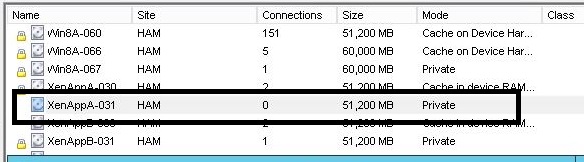
Prior to attempting to extend a Vdisk ensure that it is not locked, in use or mounted in PVS (the lock icon indicates whether it is locked or not and if it is in use the Connections will be greater than 0).Execution
Open an command prompt and issue the Diskpart Command (on some systems escalation is required).:
Select the Vdisk to modify and attach it to Diskpart:
Increase the maximum size of the VDisk (Size is in Megabytes):
Attach the vdisk and determine the correct volume to extend:
Select the volume to extend and execute the extend command:
Review your results:
Clean up and exit:
Command Cheat sheet
You must be an administrator to take these actions. Begin with a command prompt.diskpart
Select vdisk file="<PATH>\<VDISKFILE>.vhd"
list vdisk
expand vdisk maximum=62000
attach vdisk
list disk
list volume
select volume 7
extend
list volume
detach vdisk
exit
Tuesday, January 5, 2016
Powershell One Liners for Xenapp 6.5
I am preparing a report and I needed some stats about a large 6.5 XenApp environment. Powershell and ASNP Citrix* to the rescue.
Count of Applications
Get-XAApplication|measure
Count of Disabled Applicarions
Get-XAApplication|where{$_.enabled -eq $false}|measure
Count of Apps granted to "domain users"
Get-XAApplication|Get-XAAccount|where{$_.accountname -contains "domain users"}|measure
Happy counting...
Count of Applications
Get-XAApplication|measure
Count of Disabled Applicarions
Get-XAApplication|where{$_.enabled -eq $false}|measure
Count of Apps granted to "domain users"
Get-XAApplication|Get-XAAccount|where{$_.accountname -contains "domain users"}|measure
Happy counting...
Wednesday, March 18, 2015
Citrix and SHA2
SHA2 and why do I care?
Time to update those statements of support for your users and customers. With the move to the more secure certificate algorithm SHA2, things are breaking all over the place. First off, Microsoft and the Cert powers that be have declared that Certs that expire on or after 1/1/17 must be SHA2. So if you are picking up a new cert with a 2 year life it will be SHA2. What does that mean to me, you ask?
Web Interface:
I know you've been putting off that Storefront migration, but it is time to get it on the books. You can buy some time if you offload SSL (and your cert) to your Netscaler or other load balancer of choice.
Secure Gateway
It's time to put your SG out of it's misery. Netscaler VPX is your go-to replacement.
11.x and older Citrix Client
If it connects via SSL you need to upgrade. If you are at Vista + for your OS, download and install the latest Citrix client. If you have an older OS, first, shame on you. Second, the last of the 12.x clients is what you want. Modern clients are not tested on XP and can be rather inconsistent.
If you are a thin client shop and you protect your connections via SSL, it's time to update that firmware if you can. I haven't found a lot of vendor "statement of support" type documents, but if you Linux or Windows TCs have a modern (Vista+ OS) and a receiver in the 12.x land, you should be ok. The various vendors with "ThinOS" products will need to either declare support or issue an updated firmware.
Other Gotchas
Citrix will tell you that you can get a cert today with the old SHA1 and run with your legacy stuff a while longer, which is true but with a massive caveat. For the older clients to work your entire certificate chain must be SHA1. If your cert and the root cert are SHA1 and an intermediate cert is SHA2, you are not going to work. I have seen this and it is not pretty. The name of the Cert listed in the error will be the first cert in your chain that is SHA2.

Time to update those statements of support for your users and customers. With the move to the more secure certificate algorithm SHA2, things are breaking all over the place. First off, Microsoft and the Cert powers that be have declared that Certs that expire on or after 1/1/17 must be SHA2. So if you are picking up a new cert with a 2 year life it will be SHA2. What does that mean to me, you ask?
- Web Interface will not take your new cert.
- Citrix Secure Gateway will not work with your new cert.
- Your 11.x or older Citrix recviever does not work
Web Interface:
I know you've been putting off that Storefront migration, but it is time to get it on the books. You can buy some time if you offload SSL (and your cert) to your Netscaler or other load balancer of choice.
Secure Gateway
It's time to put your SG out of it's misery. Netscaler VPX is your go-to replacement.
11.x and older Citrix Client
If it connects via SSL you need to upgrade. If you are at Vista + for your OS, download and install the latest Citrix client. If you have an older OS, first, shame on you. Second, the last of the 12.x clients is what you want. Modern clients are not tested on XP and can be rather inconsistent.
If you are a thin client shop and you protect your connections via SSL, it's time to update that firmware if you can. I haven't found a lot of vendor "statement of support" type documents, but if you Linux or Windows TCs have a modern (Vista+ OS) and a receiver in the 12.x land, you should be ok. The various vendors with "ThinOS" products will need to either declare support or issue an updated firmware.
Other Gotchas
Citrix will tell you that you can get a cert today with the old SHA1 and run with your legacy stuff a while longer, which is true but with a massive caveat. For the older clients to work your entire certificate chain must be SHA1. If your cert and the root cert are SHA1 and an intermediate cert is SHA2, you are not going to work. I have seen this and it is not pretty. The name of the Cert listed in the error will be the first cert in your chain that is SHA2.
Error Text:
Unable to launch your application. Contact your help desk with the following information: Cannot connect to the Citrix Xenapp server. SSL Error 61: You have chosen not to trust "<CERTNAME>", the issue of this server's security certificate.
Happy Certing..
Tuesday, November 11, 2014
Teaching the XenApp 6.5 Servers to Reboot Themselves
As sleep is a commodity that I have been trying to bank, but all my customers want their servers to reboot at night. If only there was a way to create an unholy combination of PowerCLI and Citrix Powershell commandlets that could do the work while I sleep. This needs to be run from a box with both Citrix and PowerCli installed of course and you will need to sub in the IP of your Vcenter server.
asnp Citrix*
Add-PsSnapin VMware.VimAutomation.Core -ea "SilentlyContinue"
connect-viserver 127.0.0.1
do{
$servers=@()
$servers=(get-xazone|get-xaserver -onlineonly|where{($_.logonmode -eq "ProhibitNewLogOnsUntilRestart") -and ((get-xaserverload $_.servername).load -eq 0)}).servername
foreach ($server in $servers){restart-vm -vm $server -confirm:$false}
$servers=""
get-date
start-sleep -s 600
}
while ((get-xazone|get-xaserver -onlineonly|where{($_.logonmode -eq "ProhibitNewLogOnsUntilRestart")}) -ne $null)
asnp Citrix*
Add-PsSnapin VMware.VimAutomation.Core -ea "SilentlyContinue"
connect-viserver 127.0.0.1
do{
$servers=@()
$servers=(get-xazone|get-xaserver -onlineonly|where{($_.logonmode -eq "ProhibitNewLogOnsUntilRestart") -and ((get-xaserverload $_.servername).load -eq 0)}).servername
foreach ($server in $servers){restart-vm -vm $server -confirm:$false}
$servers=""
get-date
start-sleep -s 600
}
while ((get-xazone|get-xaserver -onlineonly|where{($_.logonmode -eq "ProhibitNewLogOnsUntilRestart")}) -ne $null)
Enjoy.
Monday, September 8, 2014
3 Line Pin to the TaskBar via PowerShell
So you want to pin some stuff to the user's taskbar quickly and with minimum code. What do you do? There are a whole lot of ugly VBS scripts out there and a few powershell scripts as well. All are pretty fat. Here is the minimal version of all them:
$Path = @("C:\Windows\system32\notepad.exe","C:\Windows\System32\shutdown.exe")
$Desktop = (New-Object -ComObject Shell.Application).NameSpace(0X0)
Foreach($itemPath in $Path){Foreach($ItemVerb in (($Desktop.ParseName($itemPath)).Verbs())){If($ItemVerb.Name.Replace("&","") -match "Pin to Taskbar"){$ItemVerb.DoIt()}}}
$Path = @("C:\Windows\system32\notepad.exe","C:\Windows\System32\shutdown.exe")
$Desktop = (New-Object -ComObject Shell.Application).NameSpace(0X0)
Foreach($itemPath in $Path){Foreach($ItemVerb in (($Desktop.ParseName($itemPath)).Verbs())){If($ItemVerb.Name.Replace("&","") -match "Pin to Taskbar"){$ItemVerb.DoIt()}}}
This is 3 lines of love for the taskbar. If you switch the 'match' to 'Pin to Start Menu' the magic moves to the start menu. Happy pinning.
Subscribe to:
Posts (Atom)